суббота, 6 февраля 2021 г. в 06:31:52 UTC+3, Matt Rowbottom:
Hi wne
Using `to_field_name` changes the value of the options/inputs, but doesn't seem to have any effect on whether a blank option is available. Using `required=False` should provide a blank option.
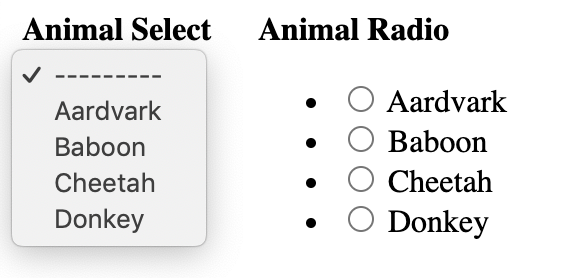
Below is a pic of how it's rendering. Animal Radio is missing a blank option.On Saturday, 6 February 2021 at 1:35:02 am UTC+11 wne...@gmail.com wrote:to_field_name="name",пятница, 5 февраля 2021 г. в 17:15:27 UTC+3, Matt Rowbottom:Hello. I think I've found a bug.
Prior to Django v3.1, both of the fields in the following form would be rendered with an empty option, labelled as '---------':```from django import formsfrom .models import Animal
class AnimalForm(forms.Form):
animal_select = forms.ModelChoiceField(
queryset=Animal.objects.all(),
required=False,
)
animal_radio = forms.ModelChoiceField(
queryset=Animal.objects.all(),
required=False,
widget=forms.RadioSelect()
)```Since Django v3.1, the field using the RadioSelect widget no longer displays the empty option.
I've tested it with the following versions:
3.0 works
3.0.12 works
3.1 broken
3.1.6 broken
3.2a1 broken
I can't find anything in the docs or the v3.1 release notes (https://docs.djangoproject.com/en/dev/releases/3.1/#forms) to explain the change.
Does anyone know if this is intentional?
You received this message because you are subscribed to the Google Groups "Django users" group.
To unsubscribe from this group and stop receiving emails from it, send an email to django-users+unsubscribe@googlegroups.com.
To view this discussion on the web visit https://groups.google.com/d/msgid/django-users/214aff09-4b8f-4fab-83f5-183515cfada5n%40googlegroups.com.

No comments:
Post a Comment